Architecture
Key Decisions
Introducing a new separation of duties can lead to a significant paradigm shift. This has technical implications and may also impact your organizational structure. Therefore, when designing a multi-tenant platform pattern, carefully consider the following aspects. As Cluster Administrator, ask yourself:
- 🔑 How much ownership can be delegated to Tenant Owners (Platform Users)?
The answer to this question may be influenced by the following aspects:
Are the Cluster Adminsitrators willing to grant permissions to Tenant Owners?
- You might have a problem with know-how and probably your organisation is not yet pushing Kubernetes itself enough as a key strategic plattform. The key here is enabling Plattform Users through good UX and know-how transfers
Who is responsible for the deployed workloads within the Tenants??
- If Platform Administrators are still handling this, a true “shift left” has not yet been achieved.
Who gets paged during a production outage within a Tenant’s application??
- You’ll need robust monitoring that enables Tenant Owners to clearly understand and manage what’s happening inside their own tenant.
Are your customers technically capable of working directly with the Kubernetes API??
- If not, you may need to build a more user-friendly platform with better UX — for example, a multi-tenant ArgoCD setup, or UI layers like Headlamp.
Personas
In Capsule, we introduce a new persona called the Tenant Owner. The goal is to enable Cluster Administrators to delegate tenant management responsibilities to Tenant Owners. Here’s how it works:
Capsule Administrators
They are promoted to Tenant-Owners for all available tenants. Effectively granting them the ability to manage all namespaces within the cluster, across all tenants.
Note: Granting Capsule Administrator rights should be done with caution, as it provides extensive control over the cluster’s multi-tenant environment. When granting Capsule Administrator rights, the entity gets the privileges to create any namespace (also not part of capsule tenants) and the privileges to delete any tenant namespaces.
Capsule Administrators can:
- Create and manage namespaces via labels in any tenant.
- Create namespaces outside of tenants.
- Delete namespaces in any tenant.
Administrators come in handy in bootstrap scenarios or GitOps scenarios where certain users/serviceaccounts need to be able to manage namespaces for all tenants.
Configure Capsule Administrators
Capsule Users
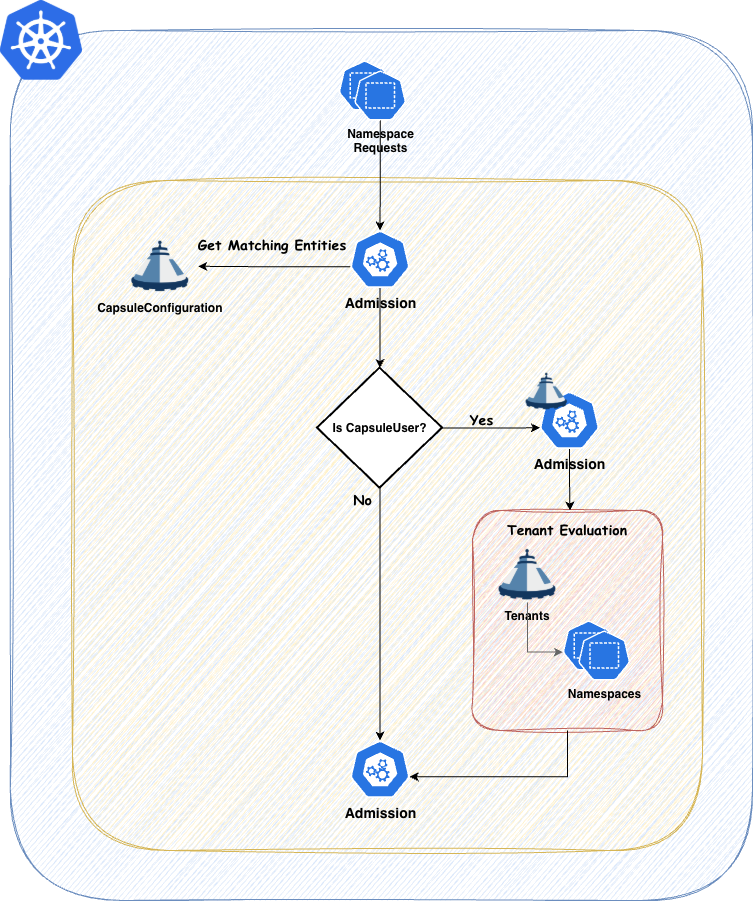
Any entity which needs to interact with tenants and their namespaces must be defined as a Capsule User. This is where the flexibility of Capsule comes into play. You can define users or groups as Capsule Users, allowing them to create and manage namespaces within any tenant they have access to. If they are not defined as Capsule Users, any interactions will be ignored by Capsule. Often a best practice is to define a single group which identifies all your tenant users. This way you can have one generic group for all your users and then use additional groups to separate responsibilities (e.g. administrators vs normal users).
Only one entry is needed to identify a Capsule User. This is only important for Namespace Admission..
Tenant Owners
Every Tenant Owner must be a Capsule User
They manage the namespaces within their tenants and perform administrative tasks confined to their tenant boundaries. This delegation allows teams to operate more autonomously while still adhering to organizational policies. Tenant Owners can be used to shift reposnsability of one tenant towards this user group. promoting them to the SPOC of all namespaces within the tenant.
Tenant Owners can:
- Create and manage namespaces within their tenant.
- Delete namespaces within their tenant.
Capsule provides robust tools to strictly enforce tenant boundaries, ensuring that each tenant operates within its defined limits. This separation of duties promotes both security and efficient resource management.
Layouts
Let’s dicuss different Tenant Layouts which could be used . These are just approaches we have seen, however you might also find a combination of these which fits your use-case.
Tenant As A Service
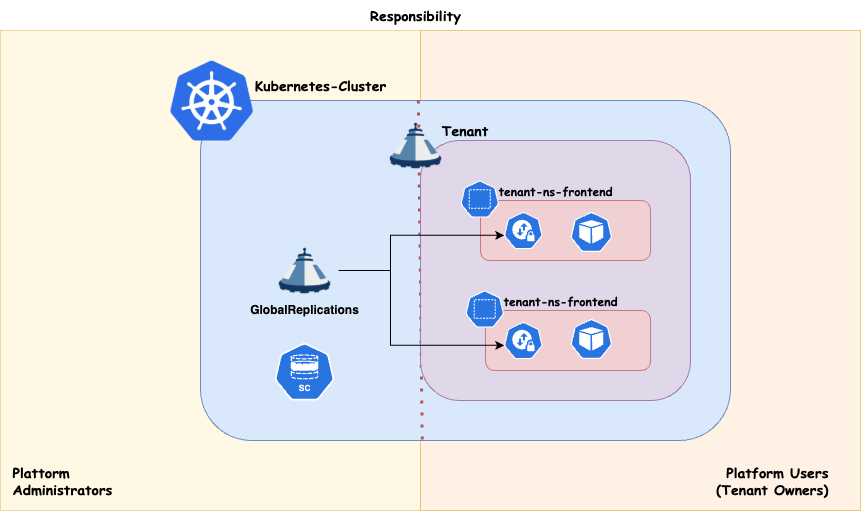
With this approach you essentially just provide your Customers with the Tenant on your cluster. The rest is their responsability. This concludes to a shared responsibility model. This can be achieved when also the Tenant Owners are responsible for everything they are provisiong within their Tenant’s namespaces.
Scheduling
Workload distribution across your compute infrastructure can be approached in various ways, depending on your specific priorities. Regardless of the use case, it’s essential to preserve maximum flexibility for your platform administrators. This means ensuring that:
- Nodes can be drained or deleted at any time.
- Cluster updates can be performed at any time.
- The number of worker nodes can be scaled up or down as needed.
If your cluster architecture prevents any of these capabilities, or if certain applications block the enforcement of these policies, you should reconsider your approach.
Dedicated
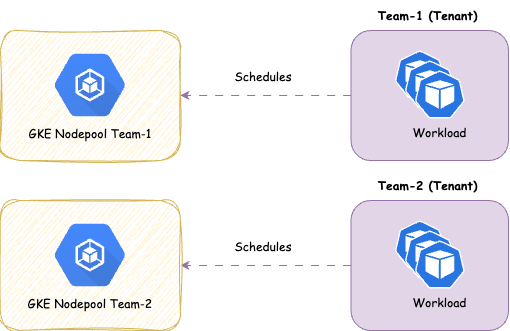
Strong tenant isolation, ensuring that any noisy neighbor effects remain confined within individual tenants (tenant responsibility). This approach may involve higher administrative overhead and costs compared to shared compute. It also provides enhanced security by dedicating nodes to a single customer/application. It is recommended, at a minimum, to separate the cluster’s operator workload from customer workloads.
Shared
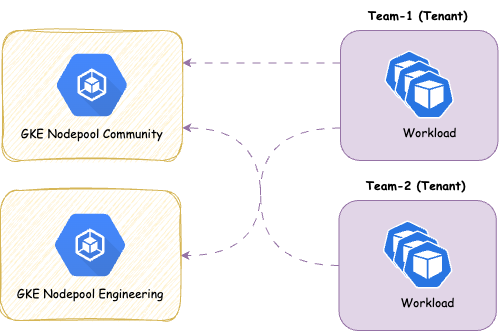
With this approach you share the nodes amongst all Tenants, therefor giving you more potential for optimizing resources on a node level. It’s a common pattern to separate the controllers needed to power your Distribution (operators) form the actual workload. This ensures smooth operations for the cluster
Overview:
- ✅ Designed for cost efficiency .
- ✅ Suitable for applications that typically experience low resource fluctuations and run with multiple replicas.
- ❌ Not ideal for applications that are not cloud-native ready, as they may adversely affect the operation of other applications or the maintenance of node pools.
- ❌ Not ideal if strong isolation is required
We provide the concept of ResourcePools to manage resources cross namespaces. There’s some further aspects you must think about with shared approaches: