Concepts
Key design decisions, personas, templating, and metadata reference for Capsule
Concept references explain reusable behavior shared across Capsule APIs:
1 - Architecture
Architecture references and considerations
Key Decisions
Introducing a new separation of duties can lead to a significant paradigm shift. This has technical implications and may also impact your organizational structure. Therefore, when designing a multi-tenant platform pattern, carefully consider the following aspects. As Cluster Administrator, ask yourself:
- 🔑 How much ownership can be delegated to Tenant Owners (Platform Users)?
The answer to this question may be influenced by the following aspects:
Are the Cluster Administrators willing to grant permissions to Tenant Owners?
- You might have a problem with know-how and probably your organisation is not yet pushing Kubernetes itself enough as a key strategic platform. The key here is enabling Platform Users through good UX and know-how transfers
Who is responsible for the deployed workloads within the Tenants?
- If Platform Administrators are still handling this, a true “shift left” has not yet been achieved.
Who gets paged during a production outage within a Tenant’s application?
- You’ll need robust monitoring that enables Tenant Owners to clearly understand and manage what’s happening inside their own tenant.
Are your customers technically capable of working directly with the Kubernetes API?
- If not, you may need to build a more user-friendly platform with better UX, for example a multi-tenant ArgoCD setup, or UI layers like Headlamp.
Personas
In Capsule, we introduce a new persona called the Tenant Owner. The goal is to enable Cluster Administrators to delegate tenant management responsibilities to Tenant Owners. Here’s how it works:
Capsule Administrators
Configure Capsule Administrators. The ClusterRoles assigned to Administrators can be configured in the CapsuleConfiguration as well.
They are promoted to Tenant-Owners for all available tenants. Effectively granting them the ability to manage all namespaces within the cluster, across all tenants.
Note: Granting Capsule Administrator rights should be done with caution, as it provides extensive control over the cluster’s multi-tenant environment. When granting Capsule Administrator rights, the entity gets the privileges to create any namespace (also not part of capsule tenants) and the privileges to delete any tenant namespaces.
Capsule Administrators can:
Administrators come in handy in bootstrap scenarios or GitOps scenarios where certain users/serviceaccounts need to be able to manage namespaces for all tenants.
Capsule Users
Configure Capsule Users
Any entity which needs to interact with tenants and their namespaces must be defined as a Capsule User. This is where the flexibility of Capsule comes into play. You can define users or groups as Capsule Users, allowing them to create and manage namespaces within any tenant they have access to. If they are not defined as Capsule Users, any interactions will be ignored by Capsule. Often a best practice is to define a single group which identifies all your tenant users. This way you can have one generic group for all your users and then use additional groups to separate responsibilities (e.g. administrators vs normal users).
Only one entry is needed to identify a Capsule User. This is only important for Namespace Admission..
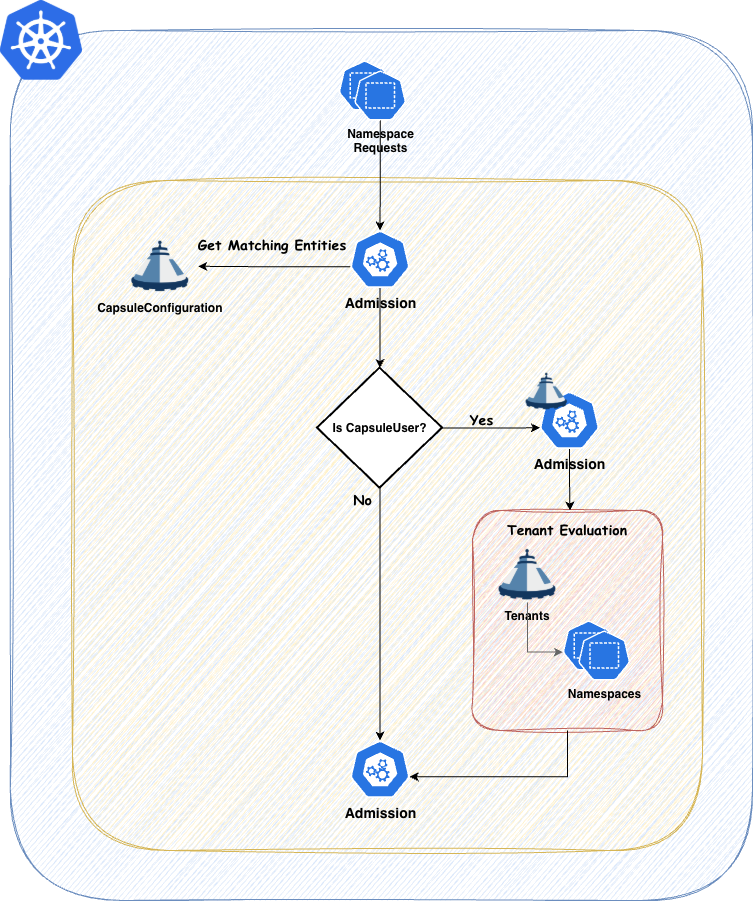
You can always verify the effective Capsule Users by checking the Configuration Status. As this is variable with Tenant Owners, the status will always show the effective users:
kubectl get capsuleconfiguration default -o jsonpath='{.status.users}' | jq

[
  {
    "kind": "Group",
    "name": "oidc:kubernetes:admin"
  },
  {
    "kind": "Group",
    "name": "projectcapsule.dev"
  },
  {
    "kind": "User",
    "name": "test-user"
  }
]
Tenant Owners
Configure Tenant Owners
Every Tenant Owner must be a Capsule User. By using the TenantOwner CRD this is automatically handeled.
They manage the namespaces within their tenants and perform administrative tasks confined to their tenant boundaries. This delegation allows teams to operate more autonomously while still adhering to organizational policies. Tenant Owners can be used to shift reposnsability of one tenant towards this user group. promoting them to the SPOC of all namespaces within the tenant.
Tenant Owners can:
- Create and manage namespaces within their tenant.
- Delete namespaces within their tenant.
Capsule provides robust tools to strictly enforce tenant boundaries, ensuring that each tenant operates within its defined limits. This separation of duties promotes both security and efficient resource management.
Layouts
Let’s discuss different Tenant Layouts which could be used . These are just approaches we have seen, however you might also find a combination of these which fits your use-case.
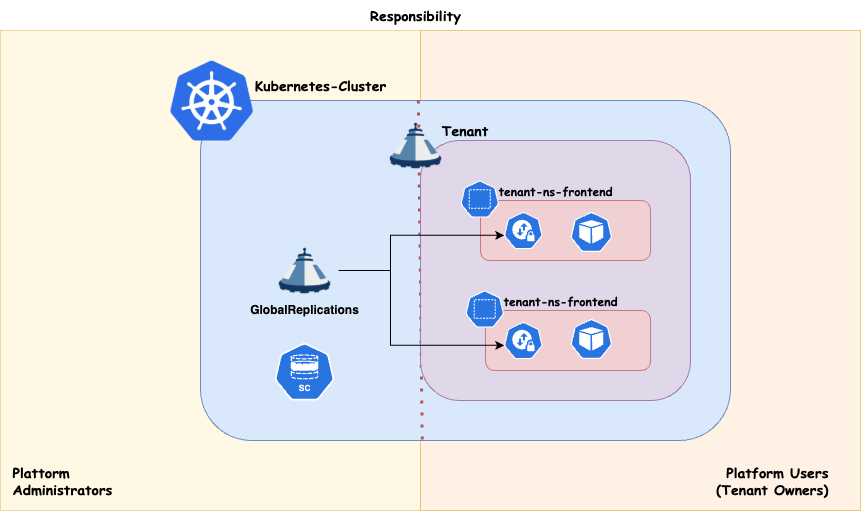
Tenant As A Service
With this approach you essentially just provide your Customers with the Tenant on your cluster. The rest is their responsibility. This concludes to a shared responsibility model. This can be achieved when also the Tenant Owners are responsible for everything they are provisiong within their Tenant’s namespaces.
Scheduling
Workload distribution across your compute infrastructure can be approached in various ways, depending on your specific priorities. Regardless of the use case, it’s essential to preserve maximum flexibility for your platform administrators. This means ensuring that:
- Nodes can be drained or deleted at any time.
- Cluster updates can be performed at any time.
- The number of worker nodes can be scaled up or down as needed.
If your cluster architecture prevents any of these capabilities, or if certain applications block the enforcement of these policies, you should reconsider your approach.
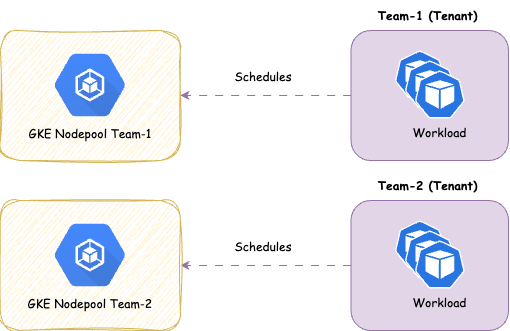
Dedicated
Strong tenant isolation, ensuring that any noisy neighbor effects remain confined within individual tenants (tenant responsibility). This approach may involve higher administrative overhead and costs compared to shared compute. It also provides enhanced security by dedicating nodes to a single customer/application. It is recommended, at a minimum, to separate the cluster’s operator workload from customer workloads.
Shared
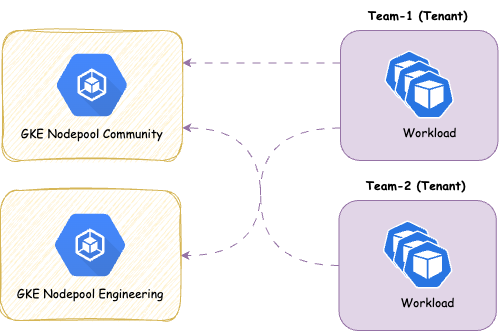
With this approach you share the nodes amongst all Tenants, therefore giving you more potential for optimizing resources on a node level. It’s a common pattern to separate the controllers needed to power your Distribution (operators) from the actual workload. This ensures smooth operations for the cluster
Overview:
- ✅ Designed for cost efficiency .
- ✅ Suitable for applications that typically experience low resource fluctuations and run with multiple replicas.
- ❌ Not ideal for applications that are not cloud-native ready, as they may adversely affect the operation of other applications or the maintenance of node pools.
- ❌ Not ideal if strong isolation is required
We provide the concept of ResourcePools or CustomQuotas to manage resources cross namespaces. There’s some further aspects you must think about with shared approaches:
2 - Parameter Schemas and Dynamic Forms
Validate parameterized APIs with JSON Schema and Kubernetes CEL, and enrich clients with live Kubernetes resource selectors.
Capsule parameter schemas define the contract between a template and the values
submitted by a consuming API object. Resource Permits currently use spec.paramSchema
to validate ResourcePermit.spec.params before context loading and rendering.
spec.paramSchema on the referenced template is the complete contract for
ResourcePermit.spec.params. It accepts JSON Schema 2020-12 keywords,
Kubernetes-compatible x-kubernetes-validations CEL rules, and Capsule’s
x-capsule-form presentation extension.
Capsule validates parameters during ResourcePermit admission, before loading context or
rendering resources. Invalid parameters are rejected and no ResourcePermit is created.
Failures that require runtime context or rendering remain visible on an accepted
request as Created with Ready=False; Capsule does not apply any resources.
JSON Schema 2020-12
Use ordinary JSON Schema for types, required fields, enums, ranges, lengths, patterns,
and conditional structure:
paramSchema:
  $schema: https://json-schema.org/draft/2020-12/schema
  type: object
  additionalProperties: false
  required:
    - subjectKind
    - subjectName
  properties:
    subjectKind:
      type: string
      enum: [User, Group, ServiceAccount]
    subjectName:
      type: string
      minLength: 1
  allOf:
    - if:
        properties:
          subjectKind:
            const: ServiceAccount
        required: [subjectKind]
      then:
        properties:
          subjectName:
            pattern: '^[a-z0-9]([-a-z0-9]{0,61}[a-z0-9])?/[a-z0-9]([-a-z0-9]{0,61}[a-z0-9])?$'
With this schema:
ServiceAccount with operations/resource-permit-runner is valid;ServiceAccount with resource-permit-runner is invalid; andUser with alice@example.com remains valid.
The example represents a ServiceAccount as namespace/name. When rendering an RBAC
Subject, split that value into the subject’s namespace and name fields.
Other useful JSON Schema keywords include dependentRequired,
dependentSchemas, contains, prefixItems, allOf, anyOf, oneOf,
and unevaluatedProperties.
Kubernetes CEL rules
Use x-kubernetes-validations for readable cross-field and collection invariants.
It has the same shape as validation rules generated from Kubebuilder’s
+kubebuilder:validation:XValidation marker. Capsule converts the parameter schema
to a Kubernetes structural schema and delegates evaluation to Kubernetes’ CEL
validator.
paramSchema:
  type: object
  additionalProperties: false
  required:
    - subjectKind
    - subjectName
  properties:
    subjectKind:
      type: string
      enum: [User, Group, ServiceAccount]
    subjectName:
      type: string
      minLength: 1
  x-kubernetes-validations:
    - rule: >-
        self.subjectKind != 'ServiceAccount' ||
        self.subjectName.matches('^[a-z0-9]([-a-z0-9]{0,61}[a-z0-9])?/[a-z0-9]([-a-z0-9]{0,61}[a-z0-9])?$')
      message: ServiceAccount subjects must use namespace/name
      reason: FieldValueInvalid
      fieldPath: .subjectName
self is the value at the schema node containing the extension. At the root it is
the whole parameters object. Use has(self.field) for optional properties.
The accepted validation-rule fields are:
| Field | Meaning |
|---|
rule | Required CEL expression returning a boolean |
message | Static failure message; required when a rule contains line breaks |
messageExpression | CEL expression returning a dynamic failure string |
reason | FieldValueInvalid, FieldValueForbidden, FieldValueRequired, or FieldValueDuplicate |
fieldPath | Relative field path associated with the error |
optionalOldSelf | Kubernetes transition-rule behavior for an optional previous value |
Rule and message-expression syntax is compiled when the template is admitted.
Evaluation uses Kubernetes CEL cost limits.
Parameter validation has no previous parameter object. A transition rule using
oldSelf therefore behaves like Kubernetes validation on create: an ordinary
transition rule is skipped, while optionalOldSelf: true can explicitly handle an
absent previous value. Use self for request-time constraints.
Dynamic failure messages are supported:
x-kubernetes-validations:
  - rule: "self.subjectKind != 'ServiceAccount' || self.subjectName.contains('/')"
    message: invalid ServiceAccount path
    messageExpression: >-
      'subjectName ' + self.subjectName + ' must use namespace/name for a ServiceAccount'
    reason: FieldValueInvalid
    fieldPath: .subjectName
If messageExpression fails or produces an invalid message, evaluation falls back
to message, then to the rule text.
Rules may also be attached to structural properties, array items, and
additional-property schemas. Their self value is scoped accordingly:
paramSchema:
  type: object
  properties:
    subjects:
      type: array
      items:
        type: object
        required: [name]
        properties:
          name:
            type: string
        x-kubernetes-validations:
          - rule: "!self.name.startsWith('system:')"
            messageExpression: "'subject ' + self.name + ' uses a reserved prefix'"
            fieldPath: .name
CEL rules must be attached to Kubernetes structural schema nodes. Do not place them
inside $defs, if/then, or another JSON-Schema-only branch. Put the rule on
a root, property, item, or additional-property node that can see the required values.
Standard JSON Schema may still use those constructs alongside CEL.
Choose the smallest validation mechanism that expresses the invariant:
| Requirement | Mechanism |
|---|
| Type, enum, range, length, or regex | JSON Schema property keyword |
| Field required for a discriminator value | JSON Schema if/then |
| Relationship between fields | x-kubernetes-validations CEL |
| Collection-item relationship | Nested CEL rule or CEL collection macro |
| Populate choices from live objects | x-capsule-form |
| Authoritatively load a selected object | Template context.resources |
x-capsule-form is an optional JSON Schema vendor extension for compatible clients
such as a Headlamp plugin. It populates a string field from live Kubernetes objects
without changing server-side JSON Schema semantics.
This complete example combines JSON Schema, conditional validation, CEL, and a live
Secret selector:
paramSchema:
  $schema: https://json-schema.org/draft/2020-12/schema
  type: object
  additionalProperties: false
  required:
    - subjectKind
    - subjectName
    - credentialsSecret
  properties:
    subjectKind:
      type: string
      enum: [User, Group, ServiceAccount]
    subjectName:
      type: string
      minLength: 1
    credentialsSecret:
      type: string
      pattern: '^[a-z0-9.-]+/[a-z0-9.-]+$'
      x-capsule-form:
        widget: kubernetes-resource
        source:
          apiVersion: v1
          kind: Secret
          namespace: request
          labelSelector: access.example.com/selectable=true
        option:
          labelTemplate: '{{ .metadata.name }}'
          valueTemplate: '{{ .metadata.namespace }}/{{ .metadata.name }}'
  allOf:
    - if:
        properties:
          subjectKind:
            const: ServiceAccount
        required: [subjectKind]
      then:
        properties:
          subjectName:
            pattern: '^[a-z0-9]([-a-z0-9]{0,61}[a-z0-9])?/[a-z0-9]([-a-z0-9]{0,61}[a-z0-9])?$'
  x-kubernetes-validations:
    - rule: >-
        self.subjectKind != 'Group' ||
        !self.subjectName.startsWith('system:')
      message: Groups using the system prefix cannot be requested
      reason: FieldValueForbidden
      fieldPath: .subjectName
The accepted form-extension shape is:
x-capsule-form:
  widget: kubernetes-resource       # required
  source:                           # required
    apiVersion: group.example.io/v1 # required; v1 is also valid
    kind: Example                   # required; one exact kind
    namespace: request              # optional: request, "*", or a namespace
    labelSelector: key=value        # optional
    fieldSelector: metadata.name=x  # optional
  option:                           # optional
    labelTemplate: '{{ .metadata.name }}'
    valueTemplate: '{{ .metadata.namespace }}/{{ .metadata.name }}'
Unknown widgets and extension fields are rejected. option may be omitted; both
templates then default to {{ .metadata.name }}.
Resource source
| Field | Required | Meaning |
|---|
apiVersion | Yes | Exact version such as v1, apps/v1, or an arbitrary CRD version |
kind | Yes | Exact Kubernetes kind; wildcards are unsupported |
namespace | No | List scope for a namespaced GVK |
labelSelector | No | Kubernetes label selector passed to the list request |
fieldSelector | No | Kubernetes field selector passed to the list request |
namespace supports four modes:
| Value | Behavior |
|---|
| omitted | Request namespace for namespaced GVKs; cluster endpoint for cluster-scoped GVKs |
request | Explicitly use the ResourcePermit namespace |
* | List a namespaced GVK across every namespace |
| namespace name | List only that literal namespace |
Any exact discoverable GVK is supported, including CRDs. Capsule validates API-version
syntax, selectors, namespaces, extension fields, and option-template syntax when the
template is admitted. It does not require the GVK to exist at that time, allowing the
template to be installed before its CRD.
The form client uses Kubernetes discovery to determine whether a GVK is namespaced or
cluster-scoped. For example:
properties:
  gatewayClass:
    type: string
    x-capsule-form:
      widget: kubernetes-resource
      source:
        apiVersion: gateway.networking.k8s.io/v1
        kind: GatewayClass
      option:
        labelTemplate: '{{ .metadata.name }} — {{ .spec.controllerName }}'
        valueTemplate: '{{ .metadata.name }}'
To list a namespaced type across all namespaces:
properties:
  sourceConfigMap:
    type: string
    x-capsule-form:
      widget: kubernetes-resource
      source:
        apiVersion: v1
        kind: ConfigMap
        namespace: '*'
        labelSelector: access.example.com/exportable=true
      option:
        valueTemplate: '{{ .metadata.namespace }}/{{ .metadata.name }}'
The user’s Kubernetes RBAC must permit the corresponding list operation.
Option templates
The listed object is an unstructured map at the Go-template root:
option:
  labelTemplate: '{{ .metadata.name }} ({{ .metadata.namespace }})'
  valueTemplate: '{{ .metadata.namespace }}/{{ .metadata.name }}'
Both fields default to {{ .metadata.name }}. They use Capsule’s safe Go-template
function map; environment-reading functions are unavailable. Keep values deterministic
because the rendered value is stored in spec.params.
Capsule finds and validates x-capsule-form recursively in properties, array items,
tuple and prefix items, $defs, definitions, allOf, anyOf, oneOf, and
conditional schemas:
paramSchema:
  type: object
  properties:
    targets:
      type: array
      items:
        type: object
        properties:
          secret:
            type: string
            x-capsule-form:
              widget: kubernetes-resource
              source:
                apiVersion: v1
                kind: Secret
                namespace: request
Arrays and multiple selections
For one or more selections, define an array and place x-capsule-form on its string
items schema. A compatible client may display this as a multi-select control or as
repeatable resource selectors:
properties:
  clusterRoles:
    type: array
    minItems: 1
    uniqueItems: true
    items:
      type: string
      x-capsule-form:
        widget: kubernetes-resource
        source:
          apiVersion: rbac.authorization.k8s.io/v1
          kind: ClusterRole
  namespaces:
    type: array
    minItems: 1
    uniqueItems: true
    items:
      type: string
      x-capsule-form:
        widget: kubernetes-resource
        source:
          apiVersion: v1
          kind: Namespace
minItems enforces at least one selection and uniqueItems prevents duplicate
generator output. The submitted values remain ordinary arrays in spec.params and
can be iterated with nested Go-template range actions.
Client and security contract
A compatible client:
- traverses JSON Schema and locates
x-capsule-form; - resolves the exact
apiVersion and kind through Kubernetes discovery; - selects the namespaced, all-namespaces, or cluster list endpoint;
- passes the configured label and field selectors;
- renders a label and value for every unstructured object; and
- submits the chosen value through ordinary
spec.params.
Discovery and listing must use the logged-in user’s credentials, not the template’s
execution ServiceAccount. Otherwise a dropdown could disclose objects the user cannot
list.
x-capsule-form is presentation metadata, not an authorization boundary:
- it grants no list permission;
- it does not prove that a value came from the dropdown;
- it does not load the selected object into rendering context; and
- it does not validate that the GVK is installed.
Validate submitted values with JSON Schema or CEL. For authoritative lookup, load the
selected object through spec.context.resources, which uses the recorded template
ServiceAccount:
paramSchema:
  type: object
  required: [crd]
  properties:
    crd:
      type: string
      x-capsule-form:
        widget: kubernetes-resource
        source:
          apiVersion: apiextensions.k8s.io/v1
          kind: CustomResourceDefinition
context:
  resources:
    - apiVersion: apiextensions.k8s.io/v1
      kind: CustomResourceDefinition
      name: '{{ .crd }}'
      index: crdInfo
      optional: false
If the context object is missing or the execution identity cannot read it, the request
becomes Ready=False.
3 - Managed Resources and Server-Side Apply
Ownership, server-side apply, resource policies, and status for TenantResource and GlobalTenantResource replications.
Capsule replications use a shared resource manager to apply
Kubernetes objects, track their ownership, and clean them up when they leave scope.
Both TenantResource and
GlobalTenantResource configure this behavior through
spec.resources[].policy.
Each resource block has its own policy, which applies to every destination produced
by its rawItems, namespacedItems, and generators. Use separate blocks when
different resources or namespaces need different ownership, protection, or cleanup
behavior.
Apply and ownership model
Capsule uses Kubernetes server-side apply (SSA) to manage the fields declared by a
replication. Stable field managers distinguish the replication and destination, so
different replications can contribute fields to the same object. Inspect the
destination’s metadata.managedFields to see which manager owns each field:
kubectl get configmap namespace-profile -n solar-uat -o json \
  | jq '.metadata.managedFields[] | {manager, operation, fieldsV1}'
SSA allows Capsule and another manager to own different fields on the same object.
Changing a field owned by another manager causes an apply conflict unless Capsule
is configured to force ownership.
During reconciliation, Capsule gathers source objects, renders templates, and applies
the resulting resources to the selected destinations. Changes to the replication
trigger reconciliation, and spec.resyncPeriod controls periodic refreshes. Update
the replication’s source objects, templates, or policy to change managed content.
Fields previously owned by Capsule can be removed when omitted from a later apply;
include them in subsequent rendered resources when they must be retained.
Resource policy
This GlobalTenantResource distributes a ConfigMap to production namespaces of
Tenants labelled energy: renewable. Its policy applies to each replicated
ConfigMap:
apiVersion: capsule.clastix.io/v1beta2
kind: GlobalTenantResource
metadata:
  name: namespace-profile
spec:
  tenantSelector:
    matchLabels:
      energy: renewable
  resyncPeriod: 60s
  resources:
    - namespaceSelector:
        matchLabels:
          environment: production
      policy:
        creation: Owner
        protect: true
        force: false
        deletion: Remove
      rawItems:
        - apiVersion: v1
          kind: ConfigMap
          metadata:
            name: namespace-profile
          data:
            environment: production
The same resource block can be used in a TenantResource to distribute the
ConfigMap within a single Tenant.
| Field | Values | Default | Behavior |
|---|
creation | Owner, Merge | Owner | Whether an existing object may be adopted |
protect | true, false | true | Whether admission blocks direct changes while managed |
force | true, false | false | Whether SSA may take conflicting field ownership |
deletion | Remove, Orphan | Remove | What happens when the parent stops managing the object |
condition | CEL boolean expression | Omitted | Whether to apply rendered content to each destination |
Owner creates an absent target and manages objects created by the applying
controller. An unrelated existing object with the same identity causes an ownership
error. Merge adopts an existing object when possible and creates it otherwise. Use
Merge when the replication should manage fields on existing objects.
force: true resolves SSA conflicts by taking ownership of the rendered fields. It
does not bypass Kubernetes RBAC, admission, or schema validation, and can displace
another controller’s ownership.
With protect: true, Capsule marks the object as protected. The generic Capsule
admission webhook rejects direct updates and deletion while the parent manages it,
except for the controller and the resolved execution ServiceAccount. Disable
protection only when another actor must modify the object during its managed lifetime.
With deletion: Remove, when multiple Capsule resource managers share an adopted
target, removing one manager preserves the shared tracking and protection metadata
while another Capsule resource manager remains. The final departing manager removes
that metadata without deleting fields owned by external managers.
Cleanup depends on both the deletion policy and whether Capsule created or adopted the
object:
| Policy | Object created by Capsule | Existing object adopted with Merge |
|---|
Remove | Delete the object | Relinquish managed fields and tracking |
Orphan | Keep the object and remove tracking/protection | Keep the object and applied fields, then remove tracking/protection |
Cleanup runs when a target leaves the desired replication output, including
namespace or Tenant deselection, resource block removal, or deletion of the
replication. It uses the last successfully reconciled policy recorded for that
target. A false apply condition does not prevent cleanup.
Orphan leaves configuration behind after the replication stops managing it. Choose
it when those resources must survive independently of the replication. For existing
manifests using spec.settings or spec.pruningOnDelete, see the
policy migration guide.
Apply conditions
Set spec.resources[].policy.condition on a TenantResource or
GlobalTenantResource to decide when rendered content is applied. One expression
is evaluated independently for every destination produced by that resource block;
separate blocks can use different conditions. The expression must return a boolean
and may contain up to 4096 characters. Omit the field to keep unconditional apply;
a blank expression is invalid.
| Input | Meaning |
|---|
object | The existing destination resource, read using the replication’s execution identity; null if it does not exist. It is not the rendered candidate. |
now | The UTC timestamp at evaluation time. Use timestamp(...) and duration(...) for time comparisons. |
Apply conditions use CEL directly. There is no self, .self, Go-template
expansion, or access to template context in this expression. Load context and
render the desired resource through generators.
Rendering happens before condition evaluation, so a condition cannot suppress
context-loading or template errors.
For example, create a target only when it is absent:
policy:
  condition: "object == null"
To initialize a target and then allow a refresh after five minutes:
policy:
  condition: |
    object == null ||
    !has(object.metadata.annotations) ||
    !('keys.example.org/rotated-at' in object.metadata.annotations) ||
    now >= timestamp(object.metadata.annotations['keys.example.org/rotated-at']) + duration('5m')
The generator must write the keys.example.org/rotated-at annotation on each
successful refresh. Guard missing objects and fields before accessing them;
use bracket notation for annotation keys containing dots or slashes. A missing
timestamp initializes this example, while a malformed timestamp causes an
evaluation error. See the complete rotation example
for the template, retention behavior, and verification steps.
| Outcome | Apply behavior |
|---|
| Condition omitted | Existing unconditional apply behavior. |
true | Apply using the block’s creation, force, and protection policies; normal authorization and ownership checks still apply. |
false | Skip rendered content and preserve its last-apply timestamp. Reconcile protection and retain the current policy for already managed targets. A never-applied target is not adopted, protected, or modified. |
| Invalid syntax or non-boolean result type | Admission rejects the expression at spec.resources[i].policy.condition. |
| Evaluation or target-read error | The target is not written; the failure is reported through existing status. A forbidden read is not treated as an absent object. |
There is no configurable action for a false result. Conditions do not provide
an all-or-nothing transaction across targets: each target is evaluated separately.
They also do not change SSA retention. To preserve old fields owned by Capsule,
include them in subsequent rendered resources, as the age-key example does.
For example, changing protect: true to protect: false removes protection on
an already managed target even while its condition is false, provided no other
Capsule resource manager still shares the target. Protection is also reconciled
when the condition becomes true or is removed; protection established during a
skipped apply does not persist after a sole manager disables it. Changing
deletion: Remove to deletion: Orphan takes effect for subsequent cleanup.
creation and force govern the next permitted content apply; changing them
does not override a false condition. Rendered labels, annotations, and data
remain unchanged, including key material and rotation timestamps. Capsule may
patch its own protection metadata, so the target’s resource version can change.
When that metadata already matches, a skipped reconciliation performs no target
write. Policy changes that fail to reconcile are reported through existing status.
Evaluation lifecycle
Both replication APIs render and evaluate conditions during reconciliation,
including periodic resync. This makes conditions suitable for recurring namespace
configuration and key rotation. Time passing alone does not trigger an apply; the
condition is checked the next time the replication reconciles. Choose a
spec.resyncPeriod that suits the required refresh interval.
Scope, tracking, and cleanup
For namespaced targets in the default Namespace scope, Capsule uses the selected
destination Namespace, which can differ from the Namespace containing a
TenantResource. A TenantResource is restricted to namespaced resources within
its own Tenant. A GlobalTenantResource can also manage cluster-scoped resources
and use spec.scope to control whether resources are rendered per Namespace, per
Tenant, or once. See replication scope for those
options. Cluster-scoped resources are applied without a namespace.
Capsule records processed targets in the replication’s .status.processedItems,
including whether they were created or adopted and the policy used for cleanup.
Successful targets remain recorded if a later target fails, so subsequent
reconciliation can retry failures and clean up resources that leave scope.
Replicated objects may carry tracking labels such as:
metadata:
  labels:
    projectcapsule.dev/created-by: resources
    projectcapsule.dev/managed-by: resources
created-by identifies resources Capsule created; managed-by identifies resources
under management, including adopted objects. Capsule sets tracking metadata
independently of the rendered manifest, so a template cannot forge whether an
object was created or adopted. Use processed-item status to inspect a particular
replication’s relationship to a target.
Status and failures
Both replication APIs report their managed resources through .status.processedItems.
For example, the namespace-profile GlobalTenantResource can report successful
ConfigMap replication into two namespaces of the solar Tenant:
status:
  size: 2
  selectedTenants:
    - solar
  processedItems:
    - version: v1
      kind: ConfigMap
      namespace: solar-uat
      name: namespace-profile
      tenant: solar
      status:
        clusterScoped: false
        created: true
        lastApply: "2026-08-31T10:02:13Z"
        type: Ready
        status: "True"
        policy:
          creation: Owner
          protect: true
          force: false
          deletion: Remove
    - version: v1
      kind: ConfigMap
      namespace: solar-prod
      name: namespace-profile
      tenant: solar
      status:
        clusterScoped: false
        created: true
        lastApply: "2026-08-31T10:02:14Z"
        type: Ready
        status: "True"
        policy:
          creation: Owner
          protect: true
          force: false
          deletion: Remove
Each item identifies the target’s API group, version, kind, name, namespace, Tenant,
and scope, whether it was created or adopted, its last apply time, and its latest
condition or error. Skipped targets report ConditionNotMet: apply skipped. A
previously applied target keeps its last successful apply time; a never-applied
target has none. The retained policy records the last successful policy
reconciliation and determines subsequent cleanup; the
condition expression is evaluated from the source block and is not stored in that
snapshot. Ownership violations, SSA conflicts, RBAC denials, unavailable resource
kinds, invalid manifests, and admission failures are reported through processed-item
status and the replication’s conditions. .status.serviceAccount identifies the
ServiceAccount used to execute the replication.
kubectl get globaltenantresource namespace-profile -o json \
  | jq '.status | {size, selectedTenants, serviceAccount, processedItems, conditions}'

kubectl get tenantresource namespace-profile -n solar-system -o json \
  | jq '.status | {size, serviceAccount, processedItems, conditions}'
To recover from a failure, correct the source object, permissions, template, or
policy and let reconciliation retry. Update the replication rather than editing
its processed-item status or making direct changes to protected destination objects.
4 - Known Metadata
Labels and Annotations in Capsule Items
Labels
Labels commonly used in Capsule items are listed below. These labels are applied to the corresponding resources by the Capsule controller and can be used for filtering and selection purposes.
capsule.clastix.io/tenant
| Description | Target Objects | Audience |
|---|
Established the connection between Object and Tenant. It’s value indicates the owning Tenant | * Namespaces having a relationship to Tenants | Controller |
projectcapsule.dev/tenant
| Description | Target Objects | Audience |
|---|
Established the connection between Object and Tenant. It’s value indicates the owning Tenant. Long term replacement for capsule.clastix.io/tenant and capsule.clastix.io/managed-by labels. | * All namespaced items within a Tenant Namespace become the corresponding Tenant Label via Mutating Admission. | Controller |
capsule.clastix.io/managed-by
| Description | Target Objects | Audience |
|---|
Established the connection between Object and Tenant. It’s value indicates the owning Tenant. Long term replacement for capsule.clastix.io/tenant | * All namespaced items within a Tenant Namespace become the corresponding Tenant Label via Mutating Admission. This label is still added to keep compatibility wiht the Capsule Proxy. | User |
projectcapsule.dev/managed-by
| Description | Target Objects | |
|---|
Indicator which controller of capsule or Custom Resource is responsible for managing the corresponding Object. Mainly used in Replications to establish that objects are at least managed by one Replications. | * Any Object being influenced by Replications | User |
projectcapsule.dev/created-by
| Description | Target Objects | Audience |
|—|—|
| Indicator which controller of capsule or Custom Resource is responsible for managing the corresponding Object. Mainly used in Replications to establish that objects were originally created by a Replication. | * Any Object being influenced by Replications | Controller |
projectcapsule.dev/name
| Description | Target Objects | Audience |
|---|
| Label for tracking internal name or allowing for faster selects. Mainly used to identify relevant rulestatus | * Tenant Namespaces | Controller |
projectcapsule.dev/cordoned
| Description | Target Objects | Audience |
|---|
Indicator that a namespace is cordoned (when value equals true) | * Tenant Namespaces | User |
projectcapsule.dev/pool
| Description | Target Objects | Audience |
|---|
| Allocation of Resourcepool via ResourcePoolClaims | * ResourcePoolClaims | User |
5 - Templating
Templating in Capsule Items
Fast Templates
For simple template cases we provide a fast templating engine. With this engine, you can use Go templates syntax to reference Tenant and Namespace fields. There are no operators or anything else supported.
Available fields are:
{{tenant.name}}: The Name of the Tenant{{namespace}}: The Name of the namespace within the tenant (current context)
Sprout Templating
Our template library is mainly based on the upstream implementation from Sprout. You can find the all available functions here:
We have removed certain functions which could exploit runtime information. Therefor the following functions are not available:
Data
You can provide structured data for each Tenant which can be used in templating:
apiVersion: capsule.clastix.io/v1beta2
kind: Tenant
metadata:
  name: solar
spec:
  data:
    bool: true
    foo: bar
    list:
    - a
    - b
    number: 123
    obj:
      nested: value
Replication Context
Templates rendered by a TenantResource or GlobalTenantResource always have the metadata of the replication object available under $.replications.metadata. An explicit resources[].context is not required.
Commonly used fields include:
$.replications.metadata.name$.replications.metadata.namespace for a namespaced TenantResource$.replications.metadata.labels$.replications.metadata.annotations$.replications.metadata.uid$.replications.metadata.resourceVersion$.replications.metadata.generation$.replications.metadata.ownerReferences$.replications.metadata.finalizers
For example:
apiVersion: v1
kind: ConfigMap
metadata:
  name: {{ $.replications.metadata.name }}
  labels:
    replication-name: {{ $.replications.metadata.name | quote }}
    team: {{ index $.replications.metadata.labels "company.example/team" | quote }}
data:
  sourceNamespace: {{ $.replications.metadata.namespace | quote }}
metadata.namespace is absent for a cluster-scoped GlobalTenantResource. The context excludes managedFields and the kubectl.kubernetes.io/last-applied-configuration annotation.
Function Library
Custom Functions we provide in our template package.
getResourceByName
getResourceByName finds a Kubernetes object by metadata.name in a resource collection loaded through resources[].context.resources[].index.
getResourceByName(name string, resources any) map[string]any
The function is pipe-friendly. The indexed resource collection is passed last:
{{- $management := $.mgmt | getResourceByName "tenant-management" -}}
If no object matches, the function returns an empty map. This makes it suitable for optional resources:
{{- with ($.mgmt | getResourceByName "optional-settings") }}
data:
  source: {{ .metadata.name | quote }}
{{- end }}
If multiple objects have the requested name, rendering fails because the match is ambiguous. Use getResourceByNamespacedName when an index can contain objects from multiple namespaces.
mustGetResourceByName
mustGetResourceByName is the required variant of getResourceByName. Rendering fails if no object matches or if multiple objects have the requested name.
mustGetResourceByName(name string, resources any) map[string]any
Example using a ConfigMap value containing YAML:
{{- $management := $.mgmt | mustGetResourceByName "tenant-management" -}}
{{- $team := $management.data | get "team-a" | fromYAML -}}
subjects:
{{ $team.subjects | toYAML | indent 2 }}
getResourceByNamespacedName
getResourceByNamespacedName finds an object by both metadata.namespace and metadata.name. Use it when a context index contains resources from more than one namespace.
getResourceByNamespacedName(namespace string, name string, resources any) map[string]any
The namespace and name are supplied before the piped resource collection:
{{- $management := $.mgmt | getResourceByNamespacedName "solar-system" "tenant-management" -}}
If no object matches, the function returns an empty map. Rendering fails if the namespace and name still identify multiple objects.
deterministicUUID
deterministicUUID generates a deterministic, RFC-4122–compliant UUID (version 5 + RFC4122 variant) from a set of input strings. It is designed for use in templates where you need stable, repeatable IDs derived from meaningful inputs (e.g. cluster name, tenant, role name), instead of random UUIDs.
This is especially useful for:
- Crossplane / IaC resources that must not change IDs across reconciles
The function takes any number of strings and turns them into a UUID in a fully deterministic way.
What that means in practice:
- If you call it twice with the same values, you get the same UUID
- If any input changes, the UUID changes too
- There is no randomness involved
- The output is always a valid UUID
So from the outside, it behaves just like a normal UUID, just deterministic.
deterministicUUID(parts ...string) string
Example usage:
{{ deterministicUUID "cluster-a" "app-123" "tenant-x" "some-role" }}
generateAgeKey
generateAgeKey generates a new age X25519 key pair for use with age. It returns both the private identity and the public recipient key.
This is useful in templates where a resource needs to create an age-compatible encryption identity, for example when generating Kubernetes Secrets that are later used for encrypting or decrypting data.
This is especially useful for:
- Bootstrap secrets that need an age identity
- Generating encryption keys during initial provisioning
- Creating age recipient keys for systems that need to encrypt data for a generated identity
The function does not return a plain string. It returns an object with two fields:
Identity: the private age identity, e.g. AGE-SECRET-KEY-1...Recipient: the public age recipient, e.g. age1...
What that means in practice:
- Each call generates a new key pair
- The identity is the private key and must be treated as secret
- The recipient is the public key and can be shared with systems that need to encrypt data
- The output is not deterministic
- Calling this function during every reconcile may rotate the generated key unless the result is persisted
Example usage:
{{ $key := generateAgeKey }}
apiVersion: v1
kind: Secret
metadata:
  name: age-key
type: Opaque
stringData:
  identity: {{ $key.Identity | quote }}
  recipient: {{ $key.Recipient | quote }}
Output:
apiVersion: v1
kind: Secret
metadata:
  name: age-key
type: Opaque
stringData:
  identity: "AGE-SECRET-KEY-1..."
  recipient: "age1..."
Because this function creates a new random key pair on every call, it should usually only be used when the generated Secret is created once and then reused. For continuously reconciled resources, prefer generating the key in controller logic and persisting it before using it in templates.
generateAgePQKey
generateAgePQKey generates a new age post-quantum hybrid key pair for use with age. It returns both the private identity and the public recipient key.
This is useful in templates where a resource needs to create an age-compatible encryption identity using the newer hybrid recipient format.
This is especially useful for:
- Bootstrap secrets that should use age hybrid keys
- Generating encryption keys during initial provisioning
- Creating public recipient keys for systems that need to encrypt data for a generated hybrid identity
- Future-facing age encryption setups where hybrid keys are preferred
The function does not return a plain string. It returns an object with two fields:
Identity: the private age hybrid identity, e.g. AGE-SECRET-KEY-PQ-1...Recipient: the public age recipient, e.g. age1...
What that means in practice:
- Each call generates a new key pair
- The identity is the private key and must be treated as secret
- The recipient is the public key and can be shared with systems that need to encrypt data
- The output is not deterministic
- Calling this function during every reconcile may rotate the generated key unless the result is persisted
Example Usage:
{{ $key := generateAgePQKey }}
apiVersion: v1
kind: Secret
metadata:
  name: age-pq-key
type: Opaque
stringData:
  identity: {{ $key.Identity | quote }}
  recipient: {{ $key.Recipient | quote }}
Output:
apiVersion: v1
kind: Secret
metadata:
  name: age-pq-key
type: Opaque
stringData:
  identity: "AGE-SECRET-KEY-PQ-1..."
  recipient: "age1..."
Because this function creates a new random key pair on every call, it should usually only be used when the generated Secret is created once and then reused. For continuously reconciled resources, prefer generating the key in controller logic and persisting it before using it in templates.